How it works
To use this tool you need to install it into your cluster via Helm with this command:
helm repo add external-secrets https://charts.external-secrets.io

helm install external-secrets \
   external-secrets/external-secrets \
    -n external-secrets \
    --create-namespace
For the full guide, check: external-secrets.io

External Secret operates in the cluster as an Operator. By default, 3 pods with separate functions get created in the external-secrets namespace, for the purpose of adding/removing/updating/syncing secrets between the third party and secrets inside the cluster.
External-Secret's architecture:
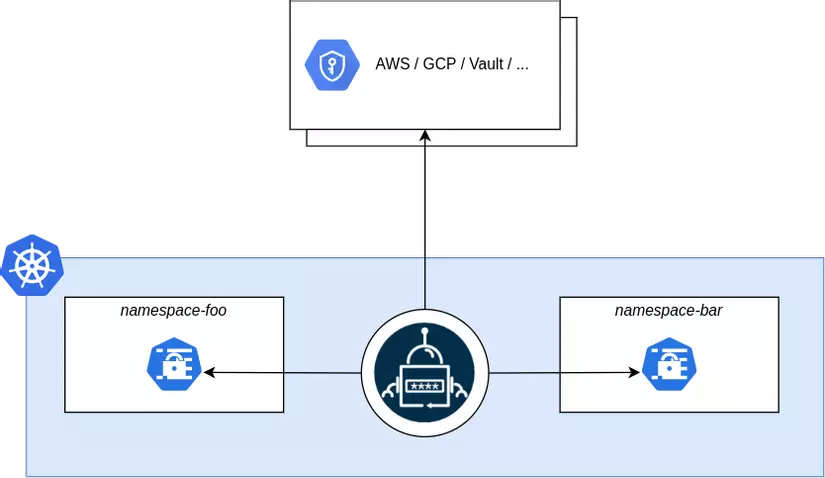
Through Custom Resource Definitions (CRDs), we define the info that helps this tool periodically call out to third parties to pull data and create the corresponding secret resource in the cluster.
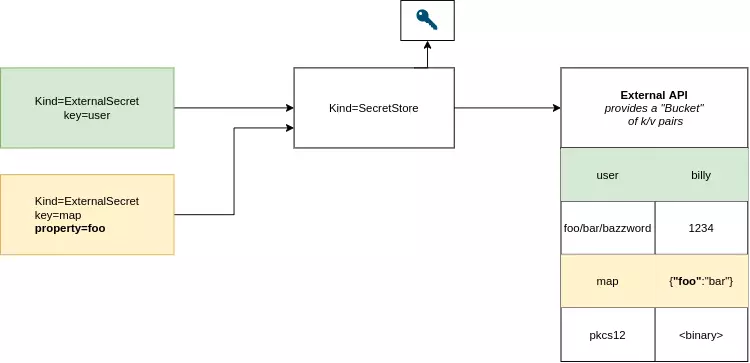
In most cases when working with External Secret, we only need to care about the SecretStore and ExternalSecret CRDs.
- SecretStore: stores authentication info and defines the API used to interact with third parties (AWS Secret Manager, etc.)
- ExternalSecret: maps data stored by the third party to data stored in Kubernetes. In this resource you can define ways to rewrite the data, etc.
That's it! So what advantages does this tool bring that made it worth building?
Advantages
- Supports pulling secrets from many different sources/providers easily. In the past, to get config mounted into an application container, we'd usually have to use an initContainer or a sidecar — this approach feels more complex and resource-heavy in comparison.
- Automatically updates the secret in the cluster when it changes. If you've read my post Automatically updating an application when a Secret or Configmap changes on Kubernetes with Reloader, we can fully build a flow that automatically updates an application running on K8s whenever a secret or config changes.
- Two-way sync between the secret on the cluster and the data stored by the third party.
- More secure in some cases
- ...
Hands-on with AWS Secrets Manager
In this post I'll walk through how to pull a secret stored on AWS Secret Manager (one of the most widely used places to store secrets today) and automatically create/sync it with a secret in the K8s cluster.
I'll assume you've already installed the External Secret Operator using the Helm command above.
Step 1: Create an Access Key on AWS and store it in the cluster.
This access key will be stored in K8s so the External Secret Operator can authenticate with AWS's service to pull the data.
To create an Access Key, go to the IAM service on AWS => Users => pick a user with sufficient GET/LIST permission on the Secret Manager service
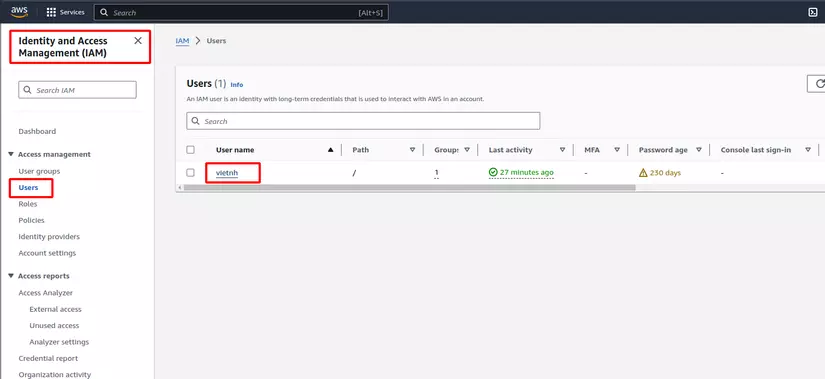
Choose Security Credentials => under the Access Key section, create a new key
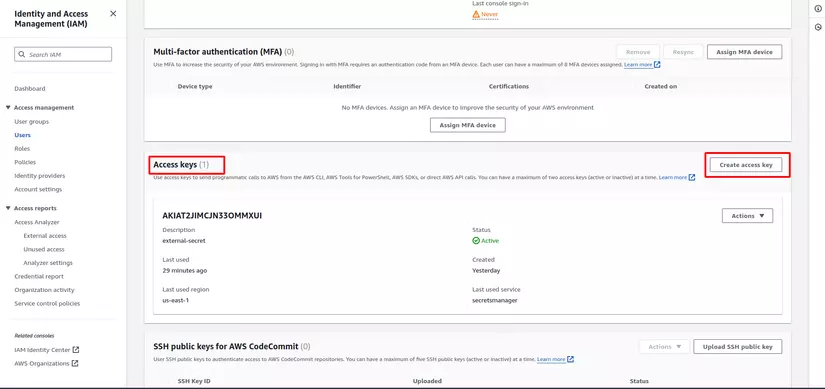
Say your key content is:
access-key: AKIAT2JIMCJN33OMMXUI
secret-access-key: sdREoxu9gXj3lDNUKMUpfjFxlqqYUgNbQKT8o+OS
We'll continue by creating a new secret resource named awssm-secret in k8s to support External-Secret's authentication, with the command:
kubectl create secret generic awssm-secret \
    --from-literal=access-key=AKIAT2JIMCJN33OMMXUI \
    --from-literal=secret-access-key=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
Step 2: Create a new key on AWS Secret Manager
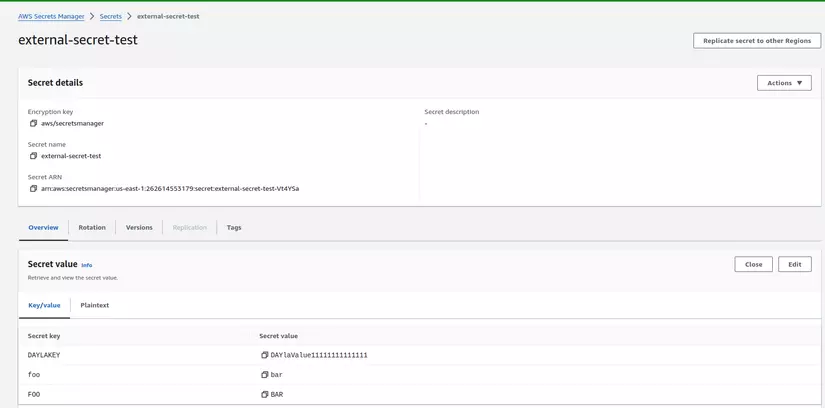
Go to the Secret Manager service and create a new secret named external-secret-test with 3 values as follows:
Step 3: Create the CRDs to sync data from AWS
First we need to create a SecretStore CRD with the following content:
apiVersion: external-secrets.io/v1beta1
kind: SecretStore
metadata:
  name: aws-secretsmanager
spec:
  provider:
    aws:
      service: SecretsManager
      # define a specific role to limit access to certain secrets.
      # role is a optional field that can be omitted for test purposes
      # role: arn:aws:iam::123456789012:role/external-secrets
      region: us-east-1
      auth:
        secretRef:
          accessKeyIDSecretRef:
            name: awssm-secret
            key: access-key
          secretAccessKeySecretRef:
            name: awssm-secret
key: secret-access-keyproviderdefines which third party is being usedservicedefines which service on that third party. For AWS, besides Secret Manager, you can also pull data from Parameter Store.region: defines the service's regionauth: defines how to authenticate with theprovider. Here we use the Access Key created and stored in the secret from step 1
Next we'll create the ExternalSecret CRD with the following content:
apiVersion: external-secrets.io/v1beta1
kind: ExternalSecret
metadata:
  name: external-secret
spec:
  refreshInterval: 1m
  secretStoreRef:
    name: aws-secretsmanager
    kind: SecretStore
  target:
    name: local-secret-name
    creationPolicy: Owner
  dataFrom:
  - extract:
      key: external-secret-test
kind: ExternalSecret— this CRD is responsible for creating the corresponding secret in the namespace and managing it, updating it whenever the third party changesrefreshInterval: defines how often it automatically re-syncs.secretStoreRef: defines the resource used to authenticate with AWS Secret Manager.target: defines the name and policy of the secret that will be created and managed by this ExternalSecret.dataFrom: defines which secret key stored on AWS Secret Manager to use.
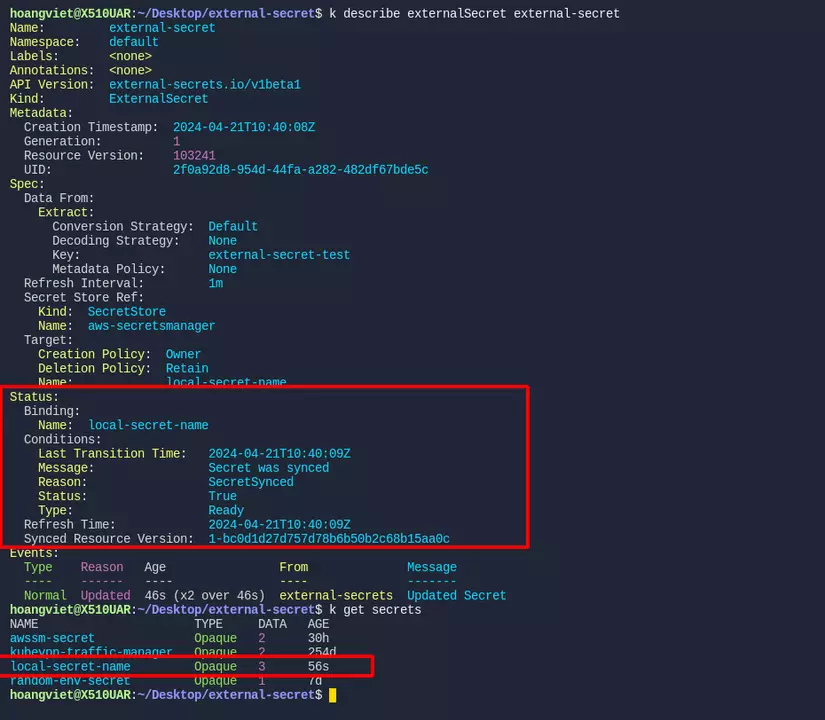
Once you create the two resources above, try describing them and getting the secret — you'll see the ExternalSecret shows Synced, and the secret has been created, like in the image below. Success! 😁😁😁
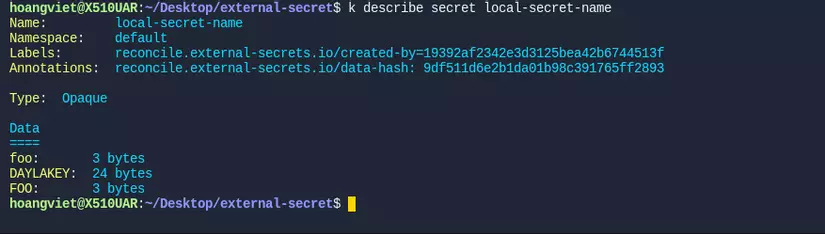
Describing the secret further, we can see all 3 keys we created on AWS Secret Manager are there.
You can also try creating another key on AWS to see if this External Secret tool syncs it too!
This post only covers the most basic, simple case for using this tool — if you want to explore more advanced features, check out the official documentation: external-secrets.io
Wrapping up
Hope this post gave you a bit more knowledge about a tool that's fairly widely used today. If you found it useful, please give me an Upvote and Follow to catch more posts related to DevOps/SRE.
Wishing you a great day!
If you're running into technical challenges or need help with systems, DevOps tools, I'm confident I can help. Get in touch at hoangviet.io.vn