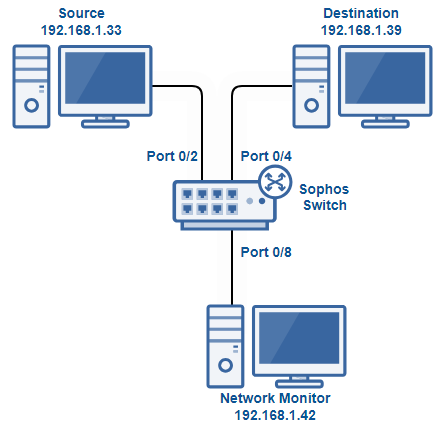
What is Traffic Mirroring?
Traffic Mirroring (or Port Mirroring) is a technique for copying network traffic from a source (e.g. a user or an application) and sending this copy to a destination system for analysis or checking. In plain terms: an incoming request gets duplicated — one copy goes to the intended destination system, which could be a web server, an API, etc. The other copy gets sent to a different system, usually a monitoring system or a similar web server/API, for analysis.
The main goal of Traffic Mirroring is to create a "copy" of real traffic without affecting the running system's operation.
Traffic Mirroring usually refers to copying requests from a client at the Application layer, handled by software. Port Mirroring, in contrast, refers to copying packets at physical devices like switches and routers.
Benefits and use cases

First and foremost, the most commonly used benefit is traffic analysis. Copying network traffic lets you check application and system performance without disrupting the production system. In many cases, integrating a monitoring system or SDK into the source code to monitor user requests is difficult and requires a large change.
Example: you want to count how many requests come in with a "Token" header. Doing this in a Production system would require changing the source code and testing repeatedly across dev, staging, uat, etc. environments. With Traffic Mirroring, you just need to build a third system to process the requests.
Traffic analysis also helps catch hidden bugs that some monitoring systems can't detect and that are only visible when you dissect individual requests.
Combining Traffic Mirroring with security systems like an IDS (Intrusion Detection System) also helps catch exploitation attempts or network attacks early.
Copying network traffic is also used for testing new features.

In many cases, new features require requests from real users rather than being testable with simulated requests. In practice, features tested with real requests tend to have fewer bugs once they hit production.
Example: once new features are ready on staging, you can experiment by mirroring a portion of production data over to the staging environment.
Integrating Traffic Mirroring
As mentioned in the intro, there are 2 places we can apply this traffic-copying technique: using hardware (routers, switches) or using software like Nginx, Apache. In this post I'll focus more on software integration since it's more common and easier.
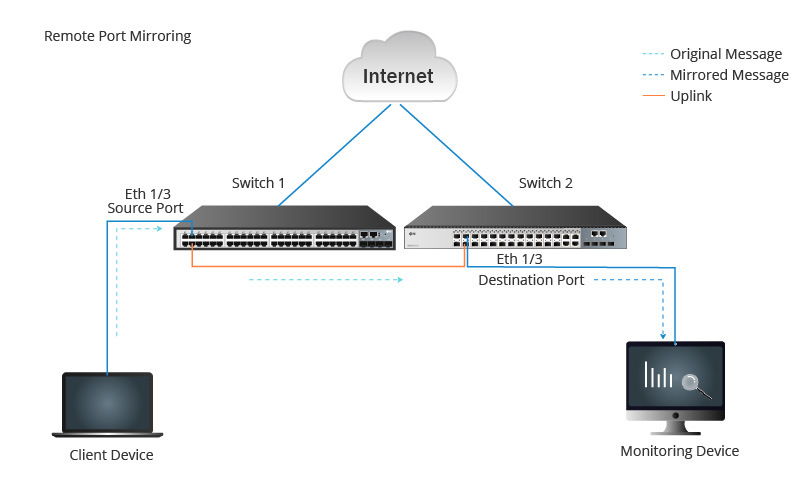
Hardware systems
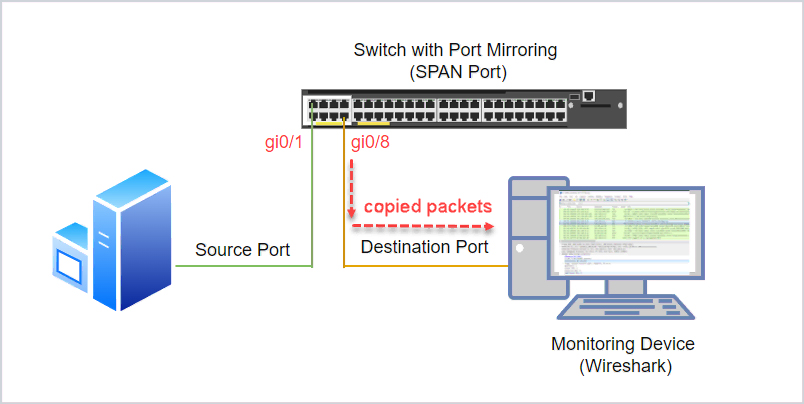
For hardware systems like routers or switches, if your device supports a SPAN port (Switched Port Analyzer port), you can use this port directly by plugging a network cable into a monitoring device.
If your device doesn't have this port, don't worry — you can check whether your device allows converting a LAN port into a SPAN port. Many devices currently support this method.
Software systems
Traffic Mirroring on Nginx
To integrate Traffic Mirroring for Nginx, you need to edit a config file, which may be nginx.conf or a file inside the sites-enabled folder, depending on where you keep your config. Here's an example config:
http {
    server {
        listen 80;
        server_name example.com;

        location / {
            proxy_pass https://api.hoangviet.io.vn;
            mirror /mirror_endpoint; # Copy traffic to another endpoint
        }

        location /mirror_endpoint {
            internal; # Make sure this endpoint isn't accessible from outside
            proxy_pass https://api-staging.hoangviet.io.vn; # Destination that processes the traffic copy
        }
    }
}
The config above copies requests to path /, which are normally forwarded to the api api.hoangviet.io.vn — it now creates an additional copy and sends it to the new backend at domain api-staging.hoangviet.io.vn.
Once configured, reload the Nginx config to activate it:
nginx -t   # Test the new config for any issues
systemctl reload nginx # Load the new config and run it
Traffic Mirroring on Apache
Similar to Nginx, Apache can also be configured to mirror traffic. In the site's config we set it up like this:
<VirtualHost *:80>
    ServerName api.hoangviet.io.vn

    ProxyPass / https://api.hoangviet.io.vn/
    ProxyPassReverse / https://api.hoangviet.io.vn/

    # Traffic mirroring configuration
    RewriteEngine On
    RewriteRule ^/(.*)$ https://api-staging.hoangviet.io.vn/$1 [P]
</VirtualHost>
The config above also copies requests from api.hoangviet.io.vn over to api-staging.hoangviet.io.vn. Explaining the mirror traffic config:
RewriteEngine On: Enables the Rewrite Engine, part ofmod_rewrite, to process URL redirect or rewrite rules.RewriteRule ^/(.*)$ https://api-staging.hoangviet.io.vn/$1 [P]- This is the main rule performing the Traffic Mirroring:
^/(.*)$: This regex matches any URL after the / (e.g./api/usersor/index.html).https://api-staging.hoangviet.io.vn/$1: Forwards traffic to serverhttps://api-staging.hoangviet.io.vn/, where$1is the remainder of the URL (captured by the regex). Example:/api/users→https://api-staging.hoangviet.io.vn/api/users.[P]: The P (Proxy) flag tells Apache to process the request throughmod_proxy, sending traffic toapi-staging.hoangviet.io.vn.
You then need to enable the mod_proxy module to be able to run the config above:
a2enmod proxy
a2enmod proxy_http
systemctl restart apache2
Things to keep in mind with Traffic Mirroring
Since network traffic gets doubled, the physical device or software has to handle a heavier load. If there are too many incoming requests, this can overload the system and affect the main system's performance.
There are also other considerations around keeping data sharing safe when mirroring traffic to a third-party service or infrastructure, if applicable.
Wrapping up
In this post I shared how to apply the Traffic Mirroring technique in practice, and how to configure it on popular software today like Apache and Nginx. Thanks for reading all the way through — I hope this post brought you some value.
If you found it useful, please Upvote and Follow me for more posts to come
If you're running into technical challenges, need help with systems, DevOps tools, or career direction, I'm confident I can help. Get in touch at hoangviet.io.vn