Today I'll take this silly Intern's place and share the errors run into, hoping it saves you a bit of time.
The "Node Mysqld API not connected, accept connect from" error
This error can have a lot of causes: network not open, an invalid NodeID, port conflicts, etc. But if you installed following all the steps in the setup guide exactly and still hit this error, "it's mostly because SELinux (Security-Enhanced Linux) blocked the connection."
How to fix it:
Step 1: Go into the SELinux config file at the path /etc/selinux/config and change the state from enforcing to disabled
Step 2: Restart the Service on both the Management Node and the SQL API Node. This has a 99% success rate.
On the Management Node:
sudo ndb_mgmd --initial --config-file=/your_config_directory/config.iniOn the MySQL API Node:
sudo service mysql restartUsing the InnoDB Engine
If you're not careful when exporting a database from some software, it's very easy for the dump to include extra clauses like
ENGINE=InnoDB DEFAULT CHARSET=utf8 COLLATE=utf8_unicode_ci;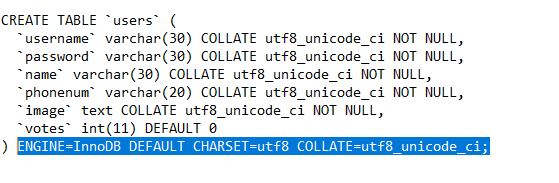
This accidentally means this table won't be usable in MySQL Cluster by default, since it uses the NDB Engine.
Starting the Mysqld API Node before the Data Node
This silly mistake cost me nearly an hour searching all over google for the error. It's simply that you have to start the ndbd service on the Data Node before starting the mysql service on the SQL API Node.
"The standard startup order is: Management Node => Data Node => API Node."
Wrapping up
Hope this saves you some time if you run into a similar issue. In the next post I'll explain how the nodes in a MySQL Clusters model work together. Have a nice day!
References
- codefaq.org — Fixing MySQL Cluster "not connected, accepting connect from" error
- dev.mysql.com — MySQL Cluster Replication Conflict Resolution
If you're running into technical challenges or need help with systems, DevOps tools, I'm confident I can help. Get in touch at hoangviet.io.vn
Thank you all! Have a nice day!