In this post, I've put together the MCP Servers I think are genuinely useful once integrated into daily work.
If you haven't heard of MCP Server/MCP Client before, check out this post of mine, where I cover the concepts related to MCP Server.
Since this is a new trend, plenty of MCP Servers on the internet are built by the community or individuals, which means some of them could contain unsafe code. You should lean toward using the official MCP Server from the relevant provider. In this post I'll cover the MCP Servers with the most stars on GitHub, or the official ones from a given provider.
Cloud provider MCP Server
Yes, that's right! We can absolutely use an MCP Server to interact with resources on a cloud provider like AWS, Azure, or GCP. If you're not familiar with the configuration or resource types on a new cloud provider, don't worry — you can use an MCP Server to apply the best practices already in use.

One of the most popular cloud providers, AWS, has shipped an MCP Server for most of its most common services, letting users interact with resources on the cloud using natural-language chat.
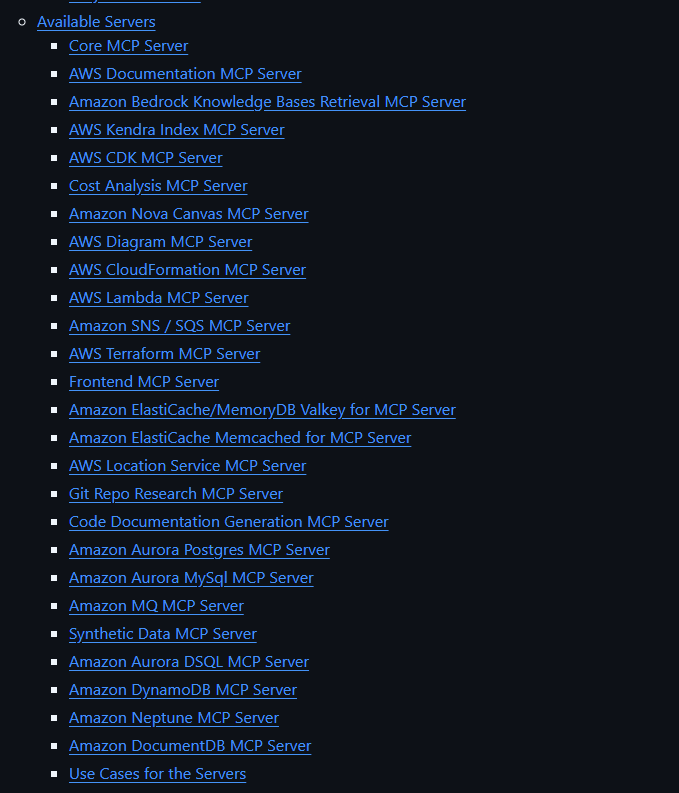
So what can we actually use a Cloud provider MCP Server for in real work?
- Aggregating resource info across multiple regions/projects at once: Thanks to its ability to run repeated queries and aggregate data, an MCP Server can pull detailed resource info from multiple different projects and regions and present it in an easy-to-understand way for a DevOps Engineer.
- Quickly pulling up the latest documentation: MCP Servers are instructed to always fetch the cloud provider's latest documentation, and retrieving info this way can save you many hours of reading docs.
- Fetching info, changing configuration, creating new resources: If you're tired of ClickOps, now you can try TalkOps — "Deploy a web server using a virtual machine in project abc-xyz."
- Suggestions to improve High Availability and Reliability for your system: With data about the running system plus data on best practices, an LLM + MCP Server can give you suggestions for upgrading the system and spot misconfigurations.
Azure recently launched an SRE AI Agent service capable of automatically detecting issues, speeding up debugging, and auto-fixing them. Read more here.
- And plenty of other use cases...
Some popular MCP Servers for cloud providers:
- AWS MCP Server: github.com/awslabs/mcp
- Google Cloud Platform MCP Server: github.com/eniayomi/gcp-mcp (Unofficial)
- Azure MCP Server: github.com/Azure/azure-mcp
- Cloudflare MCP Server: github.com/cloudflare/mcp-server-cloudflare
Kubernetes / Docker MCP Server
As a DevOps Engineer, you'll almost certainly deploy services on Kubernetes or Docker. When using these tools, we sometimes forget which flags a command needs to open a port or mount an external volume, etc. — but an LLM never forgets that.
A few use cases you, as a DevOps Engineer, can apply these MCP Servers to:
Deploying a multi-component application like WordPress with a single simple command
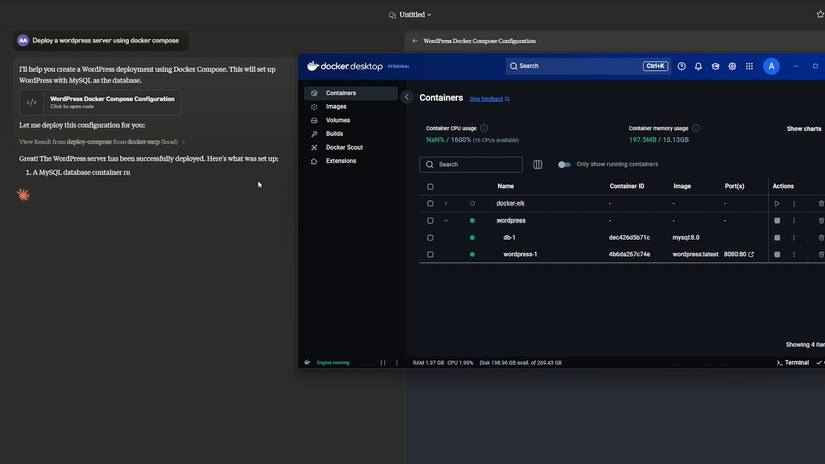
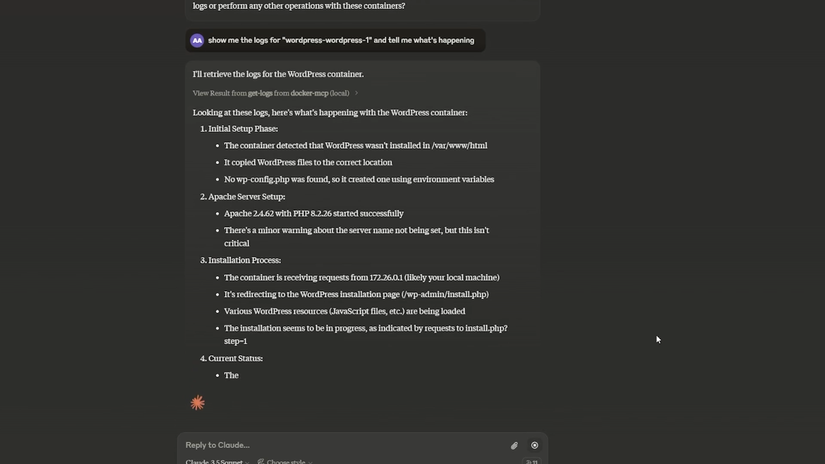
Extracting logs and analyzing errors in the system
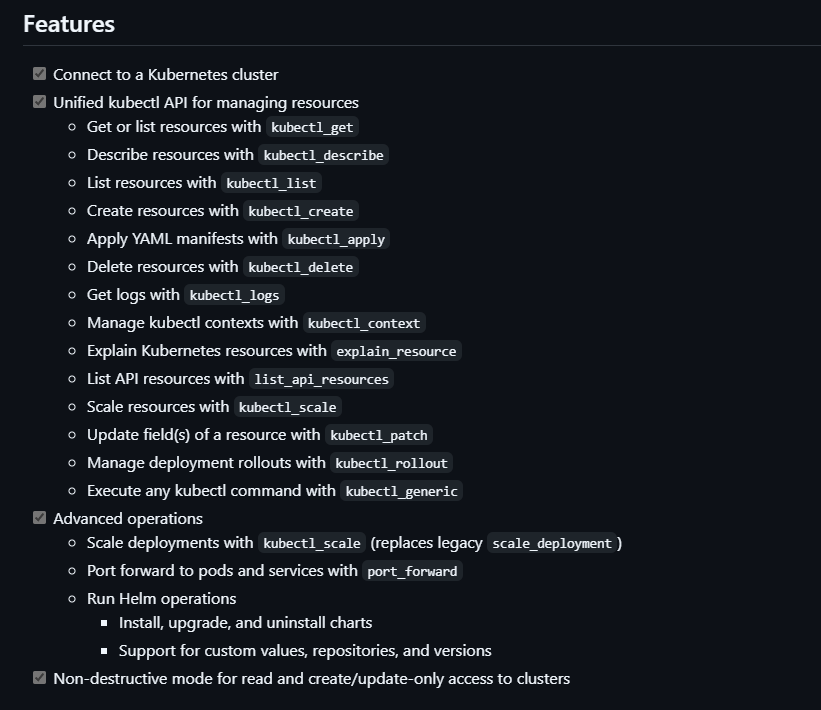
Here are the features already supported by the Kubernetes MCP Server — as you can see, it supports most of the actions a DevOps Engineer needs to interact with Kubernetes.
Docker MCP Server: github.com/QuantGeekDev/docker-mcp (Unofficial)
Kubernetes MCP Server: github.com/Flux159/mcp-server-kubernetes (Unofficial)
Git MCP Server
Git — the source-code version control tool — along with platforms like GitHub, GitLab, and Azure DevOps, are tools not just DevOps but every developer has to use at work. Using an MCP Server to interact with Git brings some surprisingly nice benefits too:
Automatically writing a commit message and pushing to the remote repo: You've probably frozen up at least once trying to write a commit message, torn between writing something meaningful or just typing "update" to move fast. Now with MCP you can hand this off to the AI.
Automatically creating a Pull Request, reviewing changes in a PR: Code pair review isn't as exhausting anymore now that an LLM can pull the diff in a PR and give you a first-pass review, offering initial improvement ideas.
Triggering, editing, and fetching info about CI/CD pipelines/workflows: A CI/CD pipeline is always an inseparable part of a DevOps Engineer's job — now you have more options for triggering it, gathering stats on the number of failed pipelines, checking the status of a running pipeline, etc.
GitHub MCP Server: github.com/github/github-mcp-server
GitLab MCP Server: github.com/modelcontextprotocol/servers/tree/main/src/gitlab (Unofficial)
Azure DevOps Server: github.com/Tiberriver256/mcp-server-azure-devops (Unofficial)
Database MCP Server
No matter how much time I spend on it, databases are, for me personally, always a hard subject to fully master, given how many different engines exist and how gnarly each database's algorithms can be. But with an MCP Server, interacting with and mastering a database becomes a lot easier. By pairing an LLM with context from an MCP Server, we can:
Write more accurate SQL for each specific database. With the ability to fetch a database's schema, an LLM can suggest complex queries for us.
Analyze and optimize indexes and queries. An MCP Server makes optimizing indexes and queries much easier, once the AI model has full context about run time, database structure, and the query plan.
Generate sample data quickly. Ever needed sample data and had no idea where to get it? This is exactly where an AI LLM shines — it can generate thousands of records with realistic-looking randomness.
Most databases now have an MCP Server, though a database is a sensitive part of a system, so you should be careful before using one. You can easily find the right MCP Server for your database engine by searching "Database Engine + MCP Server".
PostgreSQL MCP Server: github.com/crystaldba/postgres-mcp (Unofficial)
MySQL MCP Server: github.com/benborla/mcp-server-mysql (Unofficial)
MongoDB MCP Server: github.com/mongodb-js/mongodb-mcp-server
IaC Tool MCP Server
These days, any system, whether on the cloud or on-premises, uses IaC tools like Terraform or Pulumi to automatically create resources and manage configuration. So how can an MCP Server be applied to these IaC tools?
Fetching info about packages/providers: Instead of sitting there reading docs manually on a website, using an MCP Server lets us find the provider or package we need quickly, along with the exact documentation we're looking for.
Analyzing private modules: Ever had to use a private module with no usage instructions? :v With the right setup in an MCP Server, it can help analyze private modules and give you usage guidance, even write documentation.
Automatically applying, reviewing changes
Terraform MCP Server: github.com/hashicorp/terraform-mcp-server
Pulumi MCP Server: github.com/pulumi/mcp-server
Wrapping up
Thanks for reading all the way through — I hope this post brought you some value.
If you found it useful, please Upvote and Follow me for more posts to come 😄
If you're running into technical challenges, need help with systems, DevOps tools, or career direction, I'm confident I can help. Get in touch at hoangviet.io.vn