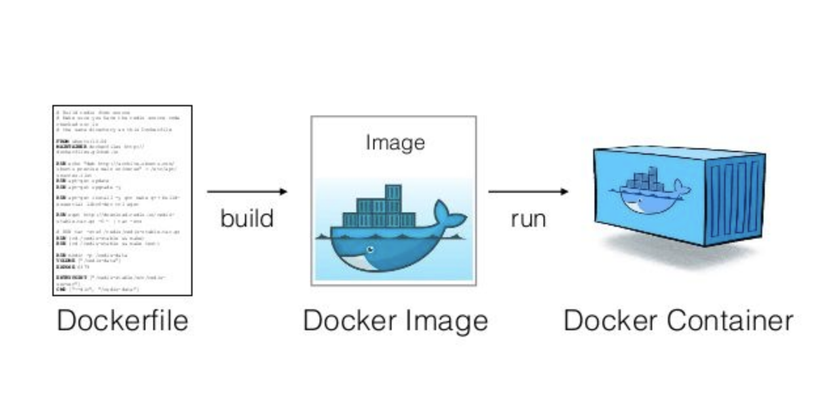
What is a Dockerfile?
The instructions declared in a Dockerfile are used to:
- Configure the OS
- Install needed software
- Copy data
- Configure the application
- Define the startup command
Benefits of using a Dockerfile:
- Consistency: ensures the application gets built the same way in every environment.
- Reusability: you can use a Dockerfile to build Docker images for different applications.
- Easy to share: share the Dockerfile with others so they can easily build and run your application.
Example of a simple Dockerfile:
FROM ubuntu:18.04

RUN apt-get update && apt-get install -y nginx

COPY index.html /usr/share/nginx/html

CMD ["nginx", "-g", "daemon off;"]
This Dockerfile will:
- Use the Ubuntu 18.04 image as the base. (Line 1)
- Install Nginx. (Line 2)
- Copy the index.html file into the /usr/share/nginx/html directory. (Line 3)
- Start Nginx with daemon off mode. (Line 4)
Why should you optimize a Dockerfile
There are many reasons to optimize a Dockerfile — here are a few of the main ones:
- Saving storage: a compact Docker image saves storage space and network bandwidth when pulling and pushing the image
- Faster build times: building the Docker image faster speeds up application development and deployment. Example: say your company's dev team spends 20 minutes building 1 project, and needs to build 3 times a day to deploy tests on dev. If you optimize the build process down to just 5 minutes, you save the dev team an extra (20-5) x 3 = 45 minutes/day. Multiply that over a year, and you save an enormous amount of time and money.
- Stronger security: minimizes security vulnerabilities, protecting the application from threats and information leaks.
- Easier to use: an optimized Dockerfile helps developers easily understand and modify the Dockerfile when needed.
Dockerfile optimization ideas
1. Use a minimal image
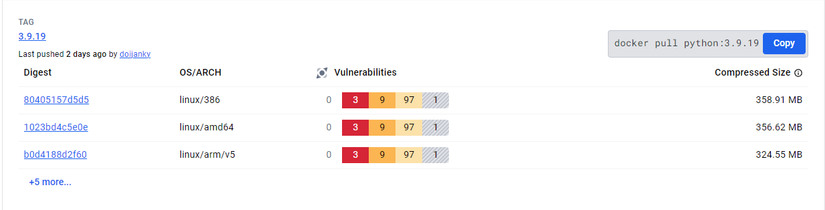
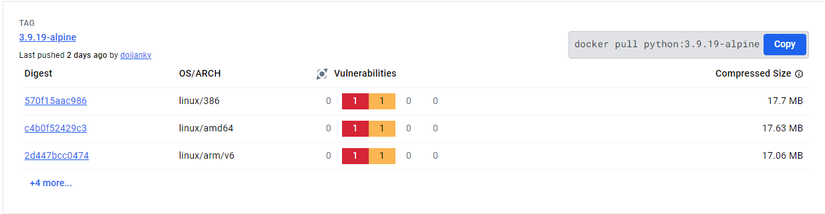
For example, when dockerizing a Python application, instead of using the base image python:3.9.19, use python:3.9.19-alpine.
The Alpine image is much smaller since it only includes essential components. In the example above, using the alpine image saves over 300MB on every image build.
2. Don't install unnecessary tools
Only install the libraries and tools your application actually needs.
- Avoid installing "full" or "dev" packages since they include many tools you don't need.
- Sometimes, to make debugging easier, people install a bunch of extra debug tools too.
To figure out which tool is needed and which isn't, I like to ask myself "Does this need to be here to run the application?" before adding any line to the Dockerfile.
Example:
# Don't
RUN apt install curl python-pip jq bash speedtest net-tools

# Do
RUN apt install python-pip
3. Combine multiple RUN commands
Writing multiple separate RUN commands might make your Dockerfile easier to read, but each command creates a corresponding image layer. Combining consecutive RUN commands into one reduces the number of layers in the Docker image, optimizing cache and reducing image build time.
Example:
# Don't
RUN pip install flask
RUN pip install gunicorn

# Do
RUN pip install flask gunicorn
4. Use multi-stage builds
Using multiple stages in a Dockerfile helps separate the phases of the build process. This is especially useful when the build-time dependencies differ from the runtime dependencies. It produces a final image with only the necessary components, keeping the final image running the application as compact and secure as possible. Dockerizing Java applications commonly uses this approach.
Using just 1 stage
FROM openjdk:11-jre-slim

WORKDIR /app

COPY pom.xml .

RUN mvn clean install

COPY target/my-app-1.0.0.jar .

CMD ["java", "-jar", "my-app-1.0.0.jar"]
Using multi-stage
#Build Stage
FROM maven:3.8-jdk-11 AS build

WORKDIR /app

COPY pom.xml .

RUN mvn clean install

# Run Stage
FROM openjdk:11-jre-slim

COPY --from=build /app/target/my-app-1.0.0.jar .

CMD ["java", "-jar", "my-app-1.0.0.jar"]
5. Don't add unnecessary files
While writing a Dockerfile, devs or devops folks will sometimes take the lazy, simplest route of COPY . . to copy the entire source code into the container, but this usually isn't necessary. Exclude unnecessary files like .gitignore, .env, README.md from being copied into the image to reduce its size.
# Don't
RUN pip install -r requirements.txt
COPY . .

# Do
RUN pip install -r requirements.txt
COPY app.py .
6. Order your commands sensibly to optimize the Docker build cache
When Docker builds an image, it reads commands top to bottom. When it hits a new layer with a change, Docker builds without using cache from that layer on. Because of that, there's a rule of thumb: layers (or commands) that change less often should be placed at the top of the Dockerfile.
Example:
# Don't
FROM openjdk:11-jre-slim

WORKDIR /app

COPY pom.xml .

RUN mvn clean install

COPY target/my-app-1.0.0.jar .

EXPOSE 8888

CMD ["java", "-jar", "my-app-1.0.0.jar"]

# Do

FROM openjdk:11-jre-slim

WORKDIR /app

EXPOSE 8888

COPY pom.xml .

RUN mvn clean install

COPY target/my-app-1.0.0.jar .

CMD ["java", "-jar", "my-app-1.0.0.jar"]
Components like WORKDIR, EXPOSE, the pom.xml library file, and library installation don't usually change much, so they should sit at the top.
7. Use cache from previously built images
Not directly related to the Dockerfile itself, but to reduce build time in environments where a previously built image of the application isn't already available in the build environment, you can use cache by pulling the previous image version and building from there.
Docker supports the --cache-from flag — use docker build --cache-from to take advantage of cache from previously built images, speeding up the build.
Example:
docker build --cache-from <image-id> -t my-app .8. Use .dockerignore
Defining a .dockerignore file and listing unnecessary files for the build helps Docker exclude these files during the build. Example for a python application:
#.dockerignore

__pycache__
*.pyc
*.pyo
*.pyd
.Python
env
pip-log.txt
pip-delete-this-directory.txt
.tox
.coverage
.coverage.*
.cache
nosetests.xml
coverage.xml
*.cover
*.log
.git
.mypy_cache
.pytest_cache
.hypothesis
Wrapping up
Hope this post helps you out at work. If you have any other ideas about optimizing the build process or Dockerfile construction, comment below and share with me.
If you found this post useful and want to read more from me, UpVote and Follow me to keep the motivation going! Have a great day 🤟🤟🤟
If you're running into technical challenges or need help with systems, DevOps tools, I'm confident I can help. Get in touch at hoangviet.io.vn