In the past, the go-to solution was Ngrok, but Ngrok gradually started charging, and the free tier stopped being as good since it now has tunnel time limits. On top of that, Ngrok's performance is fairly weak since it only has servers in the US and EU, and exposing a service through ngrok is only really suitable for testing, not for production (real users). In this post I'll share a service provided by the big player Cloudflare: Argo Tunnel. Argo Tunnel basically works similarly to ngrok but with more nice features, and is advertised as ready for production use!!!
Introducing Argo Tunnel (Cloudflare Tunnel)
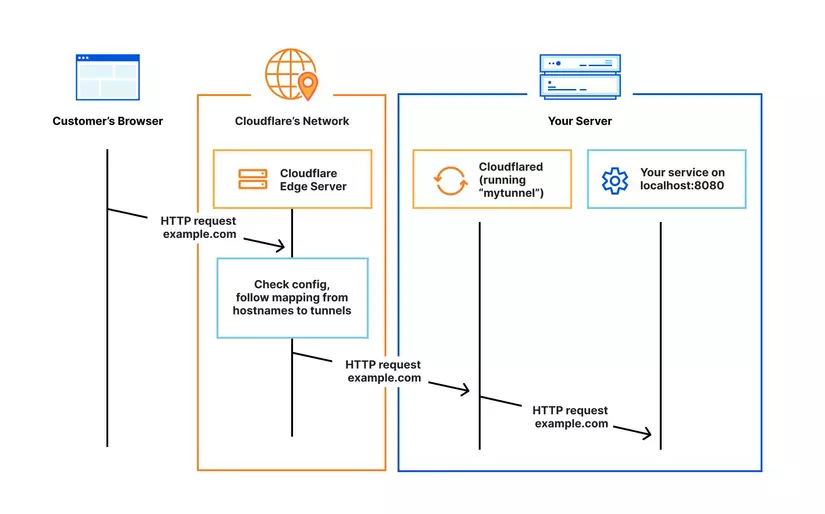
Cloudflare Tunnel gives you a secure way to connect your resources to Cloudflare without needing a WAN IP address. With Tunnel, you don't send traffic to an external IP address — instead, a lightweight daemon on your server called ('cloudflared') creates outbound-only connections to Cloudflare's global network. Cloudflare Tunnel can be used to securely connect HTTP, SSH, RDP, and other protocol services to Cloudflare. This way, your services can serve traffic through Cloudflare without being affected by attacks that bypass Cloudflare.
How it works
Cloudflared establishes outbound connections (tunnels) between your services and Cloudflare's global network. Tunnels are persistent objects that route traffic to automatically created DNS records — I'll show you that part. Within the same tunnel, you can run multiple 'cloudflared' processes (connectors). These processes establish connections to Cloudflare's global network and send traffic to the nearest Cloudflare datacenter to optimize performance. This is exactly the point where it beats ngrok!
Demo: exposing an HTTP service
Next I'll walk you through using cloudflared to put your HTTP application on the internet. To use Cloudflare Tunnel you have 2 options: WARP CLI or Cloudflared. However, WARP CLI has lower OS compatibility, so we'll prioritize using cloudflared.
Installing Cloudflared
Linux (Ubuntu)
curl -L --output cloudflared.deb https://github.com/cloudflare/cloudflared/releases/latest/download/cloudflared-linux-amd64.deb &&

sudo dpkg -i cloudflared.deb
MacOS
brew install cloudflaredWindows
Download the installer at github.com/cloudflare/cloudflared and run it
For testing/experimenting
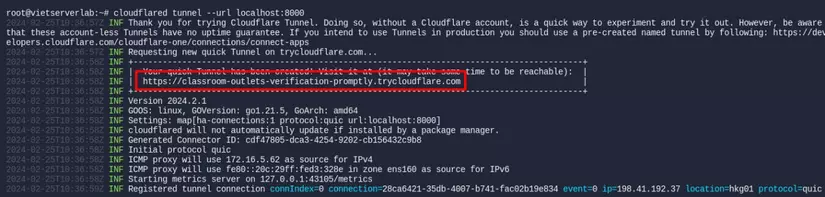
To quickly expose your local service to the internet for testing purposes or a quick, short-lived share, you can use the command:
cloudflared tunnel --url localhost:8000After running the command above, the cloudflared process will create a tunnel to Cloudflare to generate a random domain that exposes the service running on your local machine at localhost:8000. You can access your application via the domain highlighted below
For a production environment
To use this with higher stability for a production environment, I'd recommend buying your own domain and pointing its nameservers to Cloudflare. There are plenty of guides online for buying a domain and moving it to Cloudflare, so I won't repeat that here — in this section I'll assume you already have a domain and a Cloudflare account.
Step 1: Go to your Cloudflare homepage. Go to the Zero Trust section
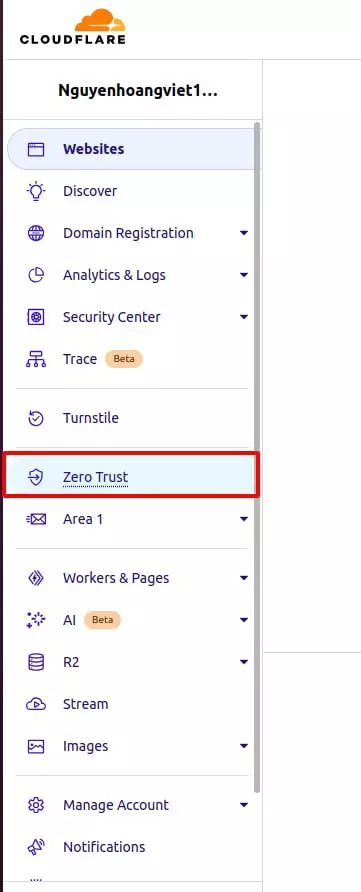
Step 2: Continue to Networks => Tunnel and choose Add a tunnel to create a new tunnel
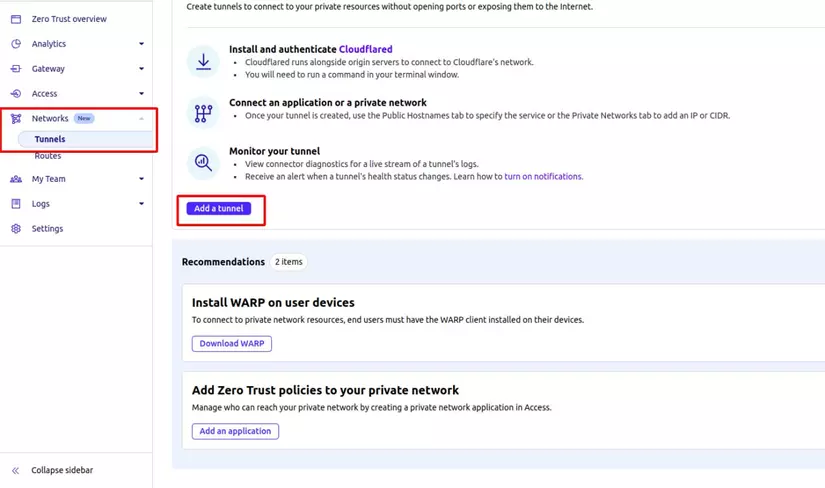
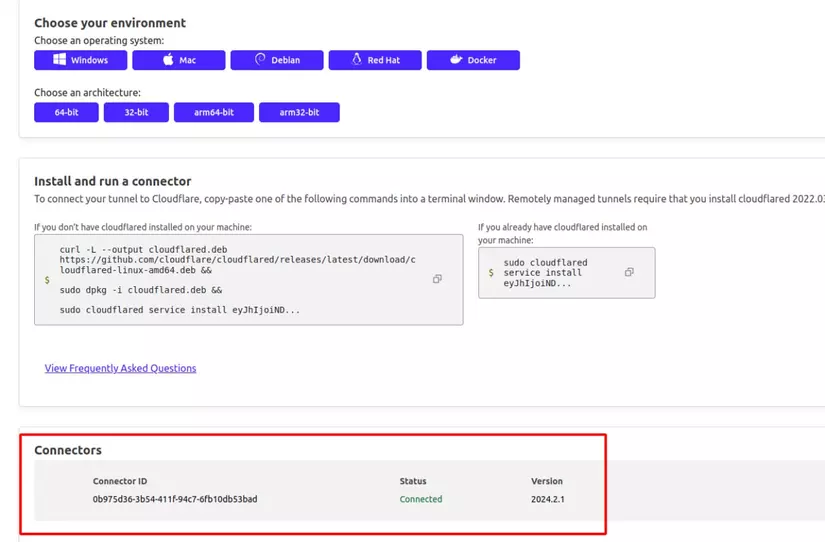
Step 3: Choose Cloudflared as the connector => name the tunnel => install the connector (cloudflared) on your local machine. If you already installed Cloudflared in the step above, you just need to run the command cloudflared service install ey.... to authenticate with this created tunnel.
If it connects successfully you'll see the connector shown below
Next!
Step 4: At this step we'll configure routing for the tunnel to choose which service you want to expose.
For example, the service I'm running locally is an HTTP service on port 8000, and I'll expose it via the domain web.hoangviet.site/
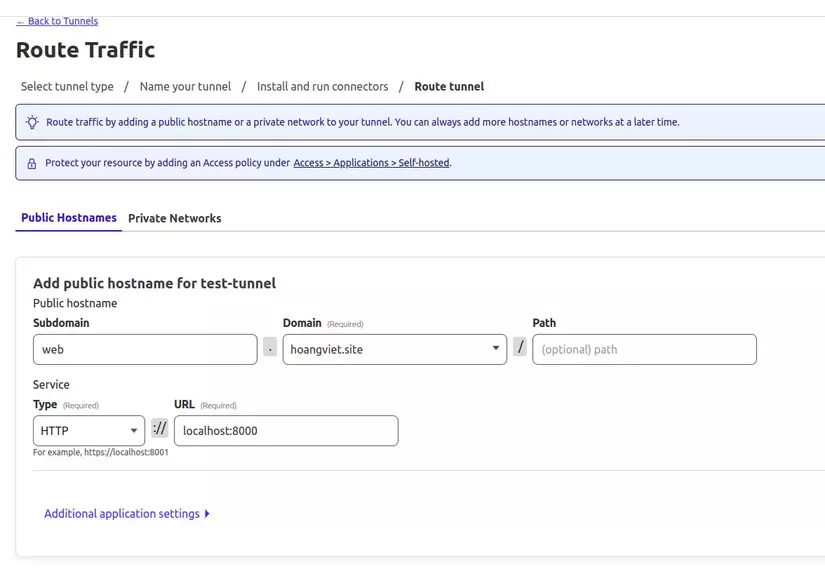
With a single tunnel, you can expose multiple services at once. Once you've filled in all the info, save the tunnel!
After saving the tunnel, if you go to the DNS record section of the domain used, you'll also see a corresponding CNAME record was added. At this point you can access your local service through the domain configured.
So we've walked through how to expose a local service to the internet through your own domain. Cloudflare Tunnel also has plenty of other neat features, like:
- Allows exposing a few other protocols like: SSH, RDP, SMB, etc.
- Allows configuring settings like timeout, HTTP header modification, Access control, etc.
Check out Cloudflare's homepage to learn more: developers.cloudflare.com
Limitations
- Cloudflare Tunnel only guarantees https security for requests coming in through this tunnel — requests going out from the service to external APIs or a Database don't get this protection
- Some services using TCP or UDP protocols may not be exposable through Cloudflare Tunnel. (I tried it with a mysql database and couldn't get it exposed yet)
- Each tunnel can only be configured with 1 single origin server — if you want to run multiple origin servers you need to create multiple tunnels
- Tunnel latency can be high in some cases due to routing through many points in Cloudflare's global network
- If Cloudflare's network gets attacked, your application will likely be affected too.
Wrapping up
Hope this post helped you out in some small way. Have a great day!
If you found this post useful, please Upvote and follow me to catch more content about DevOps, systems, and soft skills! Thanks a lot!
If you're running into technical challenges or need help with systems, DevOps tools, I'm confident I can help. Get in touch at hoangviet.io.vn