As the name suggests, instead of connecting services over the WAN or the internet like before, services can now communicate with each other over App Engine's internal network!

What is BizflyCloud App Engine?
Let me reintroduce the BizflyCloud App Engine platform for anyone who hasn't heard of or used it before. This is a platform that lets you deploy applications written in a variety of languages: Python, Java, Golang, PHP, etc., and pre-packaged applications via Image like Database, Message Queue, etc.
You can check out this platform here:
Homepage: bizflycloud.vn/app-engine
Docs: docs.bizflycloud.vn/app_engine
Benefits of communicating over a Private Network
- Reduces latency between services down to <1ms
- Bandwidth over the private network will be much larger.
- Reduces data exposure during communication.
How communication over the Private Network works
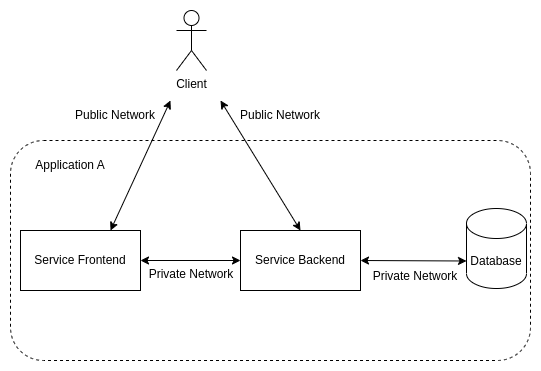
Here's a basic model when you build an application on BizflyCloud App Engine made up of 3 components (Frontend, Backend and Database)
Components in the system communicate with each other over the Private Network, and users access the application through the Public network.
Once a service is created successfully, the system sends you 2 types of URLs: Public and Private, as shown below.
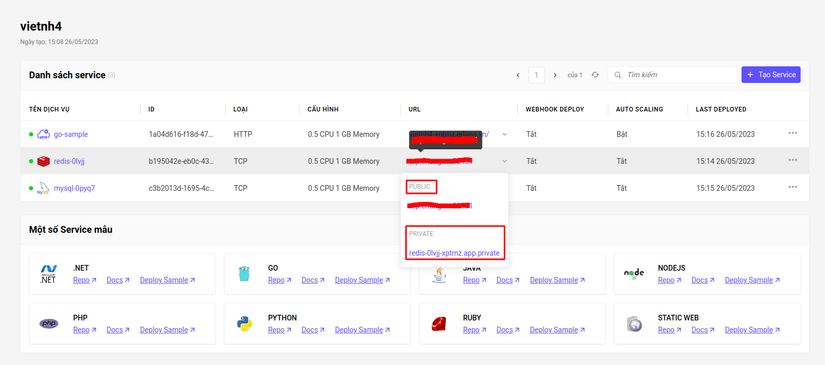
Public URL: lets you connect to the service over the internet
Private URL: lets you connect to the service over App Engine's internal network. This URL can only be used inside App Engine, and can't be used from outside
For example, in the image above, the Redis Service has a private URL of redis-0lvjj-xptmz.app.private and runs the application on port 6379
So from the go-sample service above, you can connect to Redis via the address redis-0lvjj-xptmz.app.private:6379.
Let's try connecting to the redis service using the telnet tool from the go-sample service's console
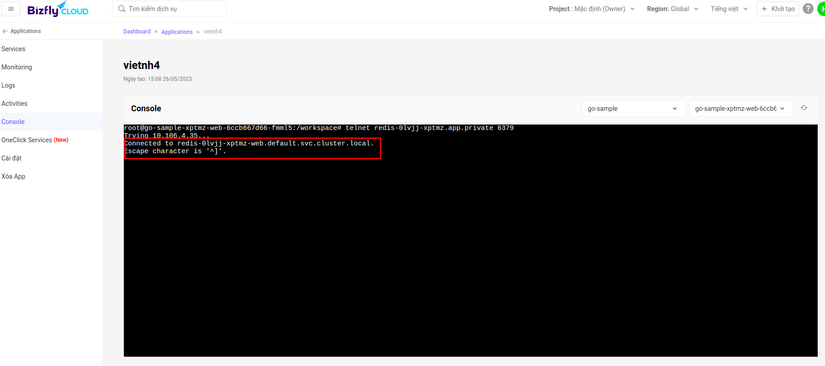
A message showing connected means you've connected successfully!
Wrapping up
So I've walked you through using the Private Network feature in BizflyCloud App Engine. Hope this feature helps you out when using this platform. If you run into any difficulty while using it, you can create a ticket to get support!
Don't forget to Upvote + Follow if you want to catch more posts!