In this post I'll point out what a Bash Script is and try writing a basic Bash Script that, in practice, probably nobody actually uses.
What is a Bash Script?
If you search online, you'll find plenty of highly abstract definitions full of terms that are hard for beginners to grasp, like "scripting language," etc. But to understand it in the simplest, easiest way to picture: a Bash Script is a file containing a set of commands executed one after another.
For example, to install software A you'd have to type commands like apt update => apt install => systemctl start => ... — you can write all these commands into 1 bash script file and run it to execute all the commands in sequence.
Pros
- Especially saves time for tasks that need to repeat many times.
- Handles highly logical tasks thanks to for loops, if-else conditionals, etc.
- Reduces errors and mistakes in your work.
- Handles repeated tasks at specific times via crontab, or runs as a service.
Cons
- I find its syntax a bit odd and hard to remember — when you're just starting to write one, you'll definitely get the syntax wrong a lot.
Denial of Service (DoS) attacks
In this post we'll practice writing a Bash Script to help prevent a DoS attack. Quick explanation: DoS attacks are attacks on service servers that exhaust CPU, Network, RAM, etc. resources, coming from 1 source — here, 1 IP.
A lot of people easily confuse DoS and DDoS — both are Denial of Service attacks, but DDoS (Distributed Denial of Service) is more dangerous since the attack source comes from many different, distributed sources, making it harder to defend against.
Writing the Bash Script
The basic idea is this: I'll pull the IPs from the last 1000 lines of Apache's Access Log and count how frequently each IP shows up, then use iptables to block any IP that looks like it's attacking. Pretty simple, right 😃 Let's get started!
First, we declare 2 Global variables: file, which stores the path to the Apache Access Log file, and tmplogfile, which stores the path to a file holding the 1000 IPs from Apache's last 1000 requests.
#! /bin/bash

file='/var/log/apache2/access.log'
tmplogfile='/root/tmp.txt'

# Get IPs from the Apache access log
tail -fn 1000 $file | head -n 1000 | cut -d " " -f 1 > $tmplogfile
The tmp.txt file will look like:
103.23.52.153
103.23.52.153
103.23.52.153
103.23.52.153
103.23.52.153
34.54.62.111
34.54.62.111
34.54.62.111
34.54.62.111
103.23.52.153
Next, we declare Array variables to store the IPs:
The ip_array array stores the 1000 IPs found in the last 1000 access log lines
The ip_array_min array stores the IPs within the 1000 IPs (deduplicated)
The ip_black array stores the IPs that violated the rule
#Push IPs into an array
declare ip_array       # Array storing IPs pulled from the apache access log
declare ip_array_min    # Array storing deduplicated IPs from ip_array
declare ip_black        # Array storing IPs that violated the rule
Next, we push the 1000 IPs in tmplogfile into the ip_array array with the command
# Add IPs from the access log into the ip_array Array
while read -r line;
do
        ip_array+=($line)
done < $tmplogfile
Then we extract the IPs in ip_array into ip_array_min, with the condition that they're not duplicated
# Extract non-duplicate IPs into ip_array_min
for ip1 in "${ip_array[@]}"
do
        add=1
        for ip2 in "${ip_array_min[@]}"
        do
                if [[ $ip1 == $ip2 ]]
                then
                        add=0
                        break
                fi
        done
        if [[ $add -eq 1 ]]
        then
                ip_array_min+=($ip1)
        fi
done
Finally, we'll check which IP has a high request count — specifically, any IP with 700 requests out of the last 1000 requests violates the rule and gets blocked using the iptables tool:
# Find IPs violating the rule and add them to ip_black
for ip1 in "${ip_array_min[@]}"
do
        count=1
        for ip2 in "${ip_array[@]}"
        do
		if [[ $ip1 == $ip2 ]]
                then
                        ((count++))
                fi
        done
        if [[ $count -gt 700 ]]
        then
                ip_black+=($ip1)
        fi
done
echo "IPs violating the rule: ${ip_black[*]}"
iptables -I INPUT -s ${ip_black[*]} -p tcp --dport 80 -j DROP
The complete file looks like:
#! /bin/bash

file='/var/log/apache2/access.log'
tmplogfile='/root/tmp.txt'

# Get IPs from the Apache access log
tail -fn 1000 $file | head -n 1000 | cut -d " " -f 1 > $tmplogfile

# Push IPs into an array
declare ip_array       # Array storing IPs pulled from the apache access log
declare ip_array_min    # Array storing deduplicated IPs from ip_array
declare ip_black        # Array storing IPs that violated the rule

# Add IPs from the access log into the ip_array Array
while read -r line;
do
        ip_array+=($line)
done < $tmplogfile

# Extract non-duplicate IPs into ip_array_min
for ip1 in "${ip_array[@]}"
do
        add=1
        for ip2 in "${ip_array_min[@]}"
        do
                if [[ $ip1 == $ip2 ]]
                then
                        add=0
                        break
                fi
        done
        if [[ $add -eq 1 ]]
        then
                ip_array_min+=($ip1)
        fi
done
#echo "${ip_array_min[*]}"

# Find IPs violating the rule and add them to ip_black
for ip1 in "${ip_array_min[@]}"
do
        count=1
        for ip2 in "${ip_array[@]}"
        do
		if [[ $ip1 == $ip2 ]]
                then
                        ((count++))
                fi
        done
        if [[ $count -gt 700 ]]
        then
                ip_black+=($ip1)
        fi
done
echo "${ip_black[*]}"
iptables -I INPUT -s ${ip_black[*]} -p tcp --dport 80 -j DROP
Setting up crontab to run the Bash Script periodically
Save the file as antiDos.sh — you can try running it with the command bash antiDos.sh or ./antiDos.sh.
Edit the /etc/crontab file to configure running this bash script every 2 minutes.
*/2 * * * * root bash /root/antiDos.sh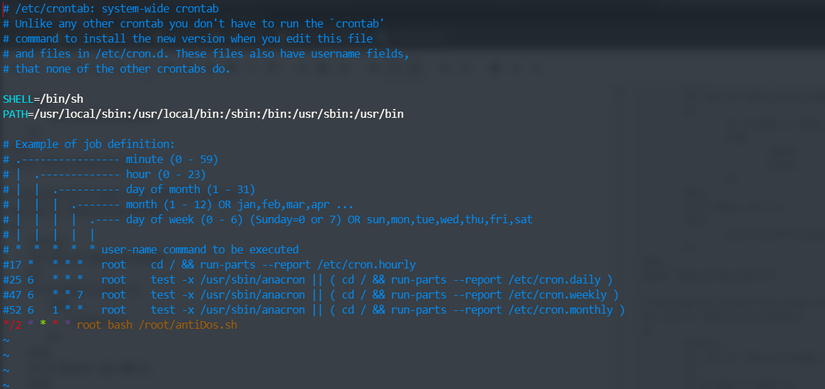
Right after saving, the Bash Script will automatically run every 2 minutes. You can also run a Bash Script as a service — learn more here: Run Shell script as systemd service.
Wrapping up
This Bash Script is purely for practice and fun — there's probably no real chance to apply it in practice 😃. Hope you picked up some neat knowledge. Have a nice day!