What is AWS Controller for Kubernetes?
With ACK, users can manage AWS cloud resources — like S3 buckets, DynamoDB tables, and many other services — directly from Kubernetes Manifest definitions via Custom Resource Definitions (CRDs). This reduces fragmentation in management work and increases consistency when deploying and operating applications on Kubernetes and AWS.
What is a Controller in Kubernetes?
ACK gets installed on a Kubernetes cluster and operates as a Kubernetes Controller, so before diving into ACK we should have a basic understanding of what a Kubernetes Controller actually does. By default, when you install a K8s cluster you get controllers like the deployment controller, statefulset controller, etc.
A Kubernetes controller operates based on a control loop. In this loop, there are three main steps: Observe, Analyze, and Act.
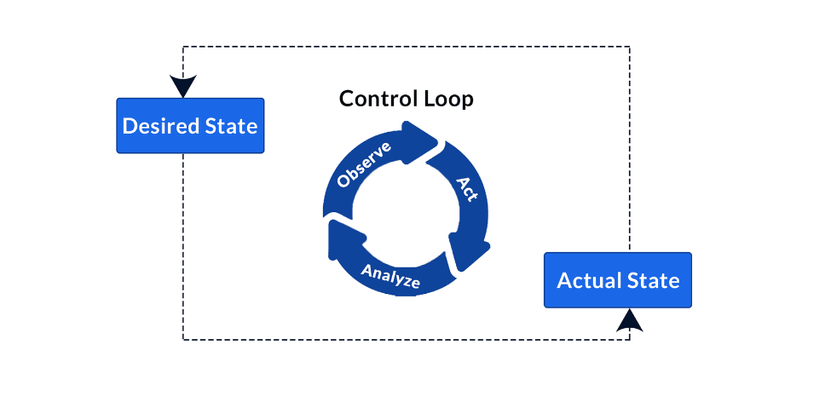
- Observe: The controller first observes the system's current state (Actual State). It pulls info from the Kubernetes cluster to understand how components like pods, services, and nodes are currently behaving.
- Analyze: After gathering info, the controller analyzes the current state and compares it against the desired state (Desired State). The desired state is defined in Kubernetes declaration files (YAML/JSON).
- Act: If it detects a difference between the current state and the desired state, the controller performs the necessary actions to bring the system to the desired state. These actions can include creating, updating, or deleting Kubernetes objects like pods, deployments, services, etc.
This loop runs continuously, ensuring the system always stays in the desired state, even when a change or an incident happens.
Example: if you delete 1 pod in a deployment with 5 pods, the controller will immediately create a new pod to make sure that deployment always has enough of the 5 pods.
How does ACK work?
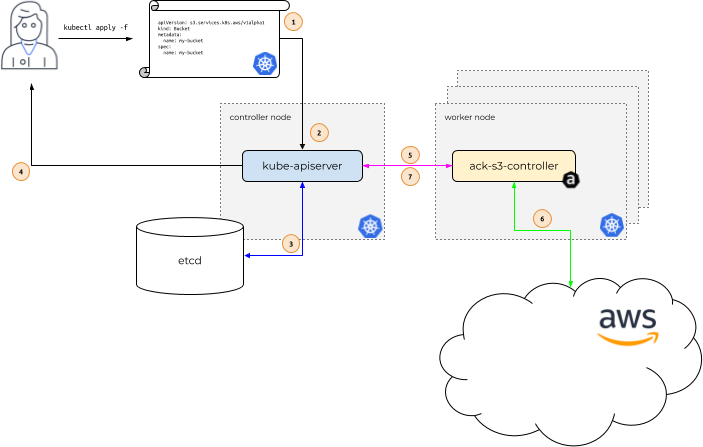
A process for deploying a resource on AWS through ACK looks like this:
- The user defines a resource: The user creates a Kubernetes resource definition file (1), like a Custom Resource Definition (CRD), to describe the AWS resources that need to be created, such as an S3 bucket.
- Sending the request to the K8s API server: The resource definition file gets sent to
kube-apiserver(2) in the Kubernetes Cluster. - Kube-apiserver stores the definition: Kube-apiserver stores this resource definition info in etcd (3), K8s's database.
- K8s confirms the resource was created: The created CRD info gets sent back to the user.
- ACK-S3-Controller receives the info: The ACK-S3-Controller on the worker node (5) receives the resource definition info from kube-apiserver.
- ACK-S3-Controller creates the resource on AWS: The ACK-S3-Controller interacts with AWS services (6) to create the defined resource, like an S3 bucket in this example.
- Updating the resource's status: The ACK-S3-Controller then updates the resource's status on Kubernetes to reflect the changes and current state of the resource on AWS (7).
How do you install ACK?
ACK's official documentation already introduces the installation steps in great detail, so I won't go through them in detail — I'll just outline the steps to give you a quick idea of how to install and grant permissions to the controller so ACK can interact with the AWS API.
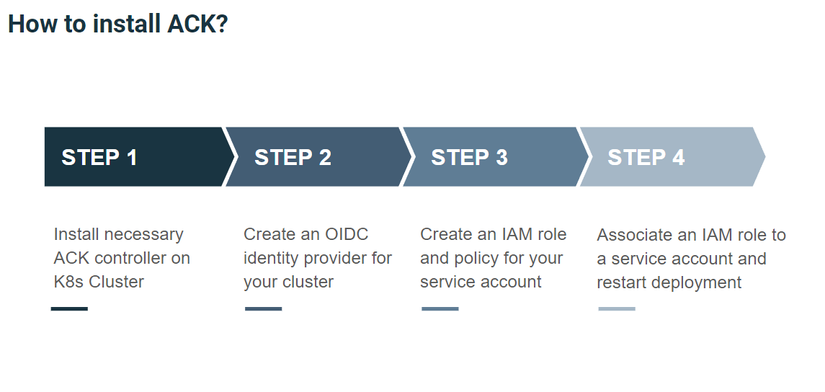
- Step 1: You can install ACK on any K8s cluster via Helm or manifest files, though authentication is easier when using EKS.
- Step 2: Create an OIDC provider for your cluster, used for authentication
- Step 3: Create an IAM Role and grant this role the appropriate permission for creating resources on AWS.
- Step 4: Allow the service account on EKS to use this IAM Role, then restart the ACK controller to pick up the new permission.
Lab: trying to create an AWS resource
In this lab section, I'll walk you through trying to create a database on AWS RDS. To do this part, you'll need:
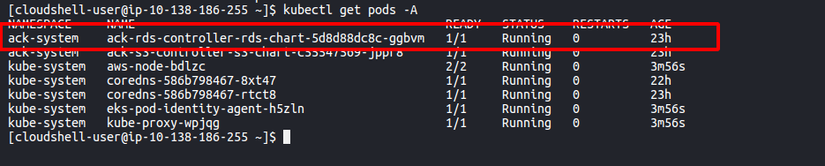
- Successfully installed the ACK RDS Controller
- Granted full permission to the Service Account the ACK RDS Controller is using
Create a manifest file rds.yaml defining the database with the following content:
# Secret
apiVersion: v1
kind: Secret
metadata:
  name: mydb-secret
  namespace: default
type: Opaque
data:
  password: bXktc2VjdXJlLXBhc3N3b3Jk # pass: my-secure-password

---

apiVersion: rds.services.k8s.aws/v1alpha1
kind: DBInstance
metadata:
  name: ack-rds
  namespace: default
spec:
  allocatedStorage: 20
  autoMinorVersionUpgrade: true
  backupRetentionPeriod: 1
  backupTarget: region
  dbInstanceClass: db.t4g.micro
  dbInstanceIdentifier: ack-rds
  deletionProtection: false
  engine: mysql
  engineVersion: 8.0.35
  masterUserPassword:
    key: password
    name: mydb-secret
    namespace: default
  masterUsername: admin
  multiAZ: false
  networkType: IPV4
  storageType: gp2
After applying this file, we'll have a DBInstance resource created in the K8s cluster in the default namespace.

On the AWS Console we can also see the database was created with the config defined in the manifest file.
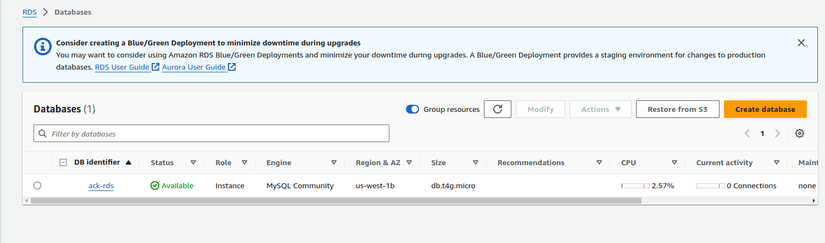
To check the status and logs of this resource creation in case of an error, you can describe the CRD and pay attention to the Status section in the resource, or you can also check the controller pod's logs.
So we've used the ACK tool to create a resource on K8s — pretty simple, right? 😁
Pros / Cons of the ACK tool
Pros
- The ACK tool can be used like a GitOps model by integrating with Helm and ArgoCD to automate the infra update process.
- Supports a mechanism that helps ensure infrastructure always matches the state defined in code. (A feature of the K8s Controller)
- In my view, defining infra this way is lighter compared to Terraform, since you can use Helm to package it.
Cons
- Many controllers have a beta or alpha API version, so they may not be stable or fully support all configuration yet
- Each type of resource you want to create on AWS requires a separate controller to manage it. This can consume resources and effort managing all the controllers in the system.
- Many resources aren't supported yet, and development is fairly slow. 🥶
Wrapping up
This post was written after about a week of researching this tool, so it certainly still has gaps. If you have any questions, don't hesitate to comment below.
Thanks for reading this far. If this post brought you value, give me an Upvote! Have a nice day! 👋🏻
If you're running into technical challenges or need help with systems, DevOps tools, I'm confident I can help. Get in touch at hoangviet.io.vn