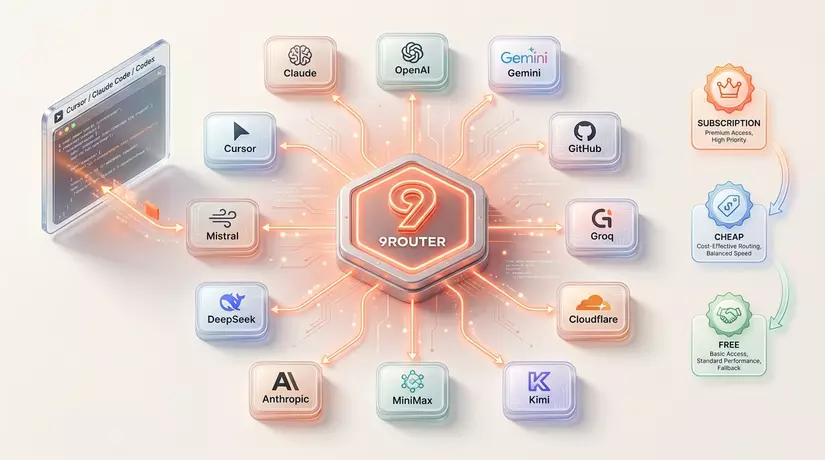
9Router exists to solve exactly that problem — automatically falling back across different AI providers, optimizing cost as much as possible, and never leaving your work interrupted.
What is 9Router?
9Router is a local proxy server that runs on your machine, acting as the middleman between AI coding tools (Claude Code, Cursor, Cline...) and AI providers (Anthropic, OpenAI, Gemini, GLM...).
Instead of calling a single provider directly, you point your tool at http://localhost:20128/v1 — 9Router handles the rest: translating formats, tracking quota, and automatically switching to the next provider when needed.
┌─────────────────┐
│  Claude Code /  │
│  Cursor / Cline │
└────────┬────────┘
         │ http://localhost:20128/v1
         ▼
┌────────────────────────────────────┐
│          9Router                   │
│  • Format translation              │
│  • Quota tracking                  │
│  • Auto token refresh              │
└────────┬───────────────────────────┘
         │
         ├──▶ [Tier 1] Claude Code / Codex / Gemini CLI (subscription)
         │         ↓ quota exhausted
         ├──▶ [Tier 2] GLM ($0.6/1M), MiniMax ($0.2/1M)
         │         ↓ budget limit
         └──▶ [Tier 3] iFlow, Qwen, Kiro (free, unlimited)
This 3-tier fallback mechanism is the core of 9Router — it makes sure you never stop coding.
Key concepts
Provider
These are the AI model providers — Anthropic, OpenAI, Google Gemini, GLM, iFlow, Qwen... 9Router supports 40+ providers and 100+ models. Each provider can be authenticated in 3 ways:
- OAuth (Claude Code, Codex, Gemini CLI, GitHub Copilot, Antigravity): log in once, 9Router refreshes the token automatically.
- API Key (OpenAI, Anthropic, DeepSeek, Groq, GLM, MiniMax...): just paste the key into the dashboard.
- Free providers (iFlow, Qwen, Kiro): log in with that provider's own account, use it without limits, no cost.
Combo
A Combo is a set of models in priority order, forming a fallback chain. When the first model runs out of quota or errors out, 9Router automatically switches to the next one.
An example of a real combo:
Combo: "my-stack"
  1. cc/claude-opus-4-6        ← subscription, highest quality
  2. glm/glm-4.7               ← cheap, $0.6/1M tokens, resets daily
  3. if/kimi-k2-thinking       ← free, unlimited
You just set the model to my-stack in your tool — everything else is automatic.
Quota Tracking
9Router tracks how many tokens have been used per provider, shown right on the dashboard along with a countdown to the next reset (5 hours, daily, weekly depending on the provider). Very useful for maximizing subscription value instead of letting quota go to waste at the end of the month.
Format Translation
Different providers use different API formats — OpenAI has its own standard, so does Anthropic (Claude), and Gemini is different again. 9Router automatically translates between these formats, so your tool only needs to speak one "language" (OpenAI-compatible).
Installation
Requirements
- Node.js 20+
- npm
Quick install via npm (recommended)
npm install -g 9router
9router
The dashboard will open automatically at http://localhost:20128. Default password: 123456 (change it right away if you deploy this to a server).
Run from source
git clone https://github.com/decolua/9router.git
cd 9router
cp .env.example .env
npm install
PORT=20128 NEXT_PUBLIC_BASE_URL=http://localhost:20128 npm run dev
Production build:
npm run build
PORT=20128 HOSTNAME=0.0.0.0 NEXT_PUBLIC_BASE_URL=http://localhost:20128 npm run start
Run with Docker
# Build image
docker build -t 9router .

# Run
docker run -d \
  --name 9router \
  -p 20128:20128 \
  --env-file ./.env \
  -v 9router-data:/app/data \
  9router
Once running:
- Dashboard:
http://localhost:20128/dashboard - API endpoint:
http://localhost:20128/v1
Connecting a provider
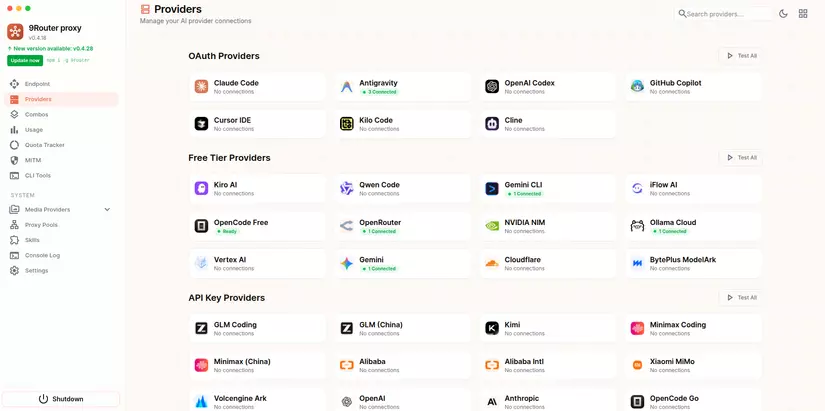
Antigravity (free — do this one first)
This provider gives you access to top-tier models from Claude (Opus 4.6, Sonnet 4.6) plus Gemini models with fairly generous quota.
- Dashboard → Providers → Connect Antigravity
- Log in with Google OAuth
- Models you can use right away:
ag/gemini-3-flash-preview,ag/gemini-2.5-pro,ag/claude-opus-4-6-thinking,ag/claude-sonnet-4-6.
Claude Code (if you're on Claude Pro/Max)
- Dashboard → Providers → Connect Claude Code
- OAuth login
- Models:
cc/claude-opus-4-6,cc/claude-sonnet-4-5-20250929,cc/claude-haiku-4-5-20251001
iFlow (free, unlimited)
- Dashboard → Connect iFlow
- OAuth login with an iFlow account
- Models:
if/kimi-k2-thinking,if/qwen3-coder-plus,if/glm-4.7,if/deepseek-r1...
GLM (cheap, good backup)
- Sign up at open.bigmodel.cn — pick the Coding Plan
- Grab an API key
- Dashboard → Add API Key → Provider:
glm→ paste the key
Model: glm/glm-4.7 — $0.6/1M tokens, quota resets at 10:00 AM daily.
Creating a Combo
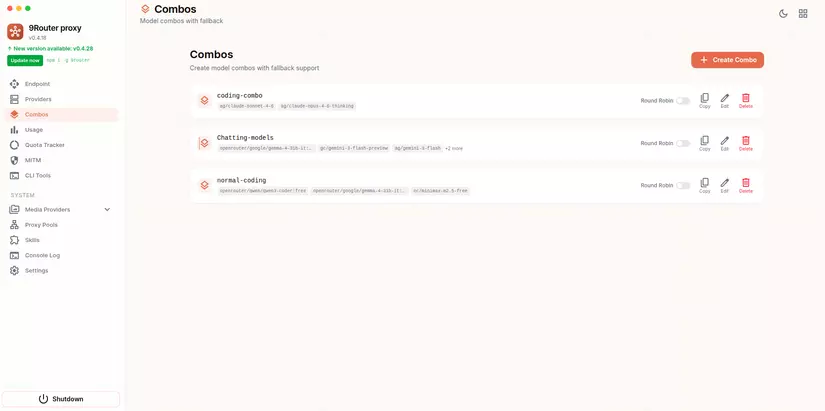
Once you have at least 2 providers, create a combo to get fallback behavior:
- Dashboard → Combos → Create New
- Give it a name (e.g.
free-comboorpremium-stack) - Add models in priority order
Zero-cost combo (entirely free):
Name: free-forever
Models:
  1. gc/gemini-3-flash-preview   (large quota)
  2. if/kimi-k2-thinking         (unlimited)
  3. qw/qwen3-coder-plus         (unlimited)
Combo that maximizes your subscription:
Name: premium-coding
Models:
  1. cc/claude-opus-4-6          (subscription - highest quality)
  2. glm/glm-4.7                 ($0.6/1M - backup)
  3. if/kimi-k2-thinking         (free - safety net)
Integrating with AI tools
Depending on which tool you want to use with 9Router, activation works a bit differently.
For example, with Antigravity or Copilot, 9Router needs a DNS record added to /etc/hosts to redirect requests through this LLM Gateway.
However, for Claude Code or Claude Cowork, you'll need to enable the Tunnel feature, and 9Router will change the LLM Gateway these tools run through to this tunnel's endpoint.
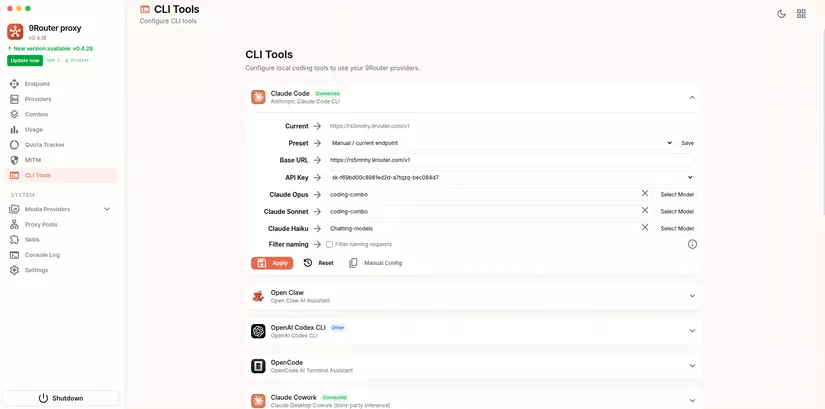
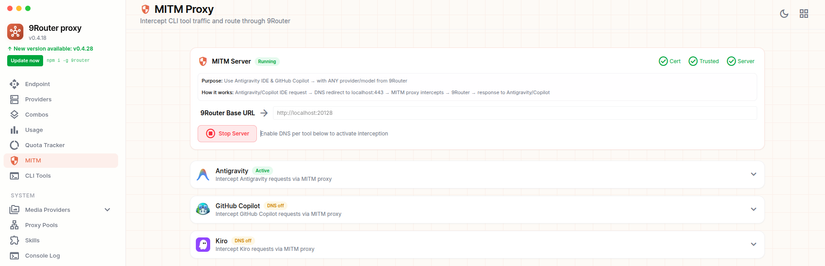
For each tool, you can pick a Combo or a specific model to override whatever options are built into that tool.
A few frequently asked questions
The dashboard shows a $200-300 cost but I'm using iFlow (free) — am I being charged?
No. That number is just a "savings tracker" — showing how much you've saved compared to using a paid API directly. 9Router never charges you for anything.
Does the token auto-refresh? Do I need to log in again?
For OAuth providers (Claude Code, Codex, Gemini...), 9Router automatically refreshes the token before it expires. If there's ever an issue: Dashboard → Provider → Reconnect.
Can I deploy this to a VPS for shared use?
Yes. Set HOSTNAME=0.0.0.0, a strong JWT_SECRET, a new INITIAL_PASSWORD, and enable REQUIRE_API_KEY=true if you're exposing it to the internet. You should also add a reverse proxy (nginx) with HTTPS.
Wrapping up
9Router helps you make the most of quota across all your providers to minimize cost, which is great for students or anyone tinkering around and getting familiar with AI.
That said, in practice I've still run into a few issues — slow model responses, or 9Router repeatedly trying to use an account that's already out of quota. These are existing bugs in 9Router, and I trust they'll be fixed soon given how actively it's being updated recently.
Either way, 9Router is still very much worth trying!
References
- GitHub: github.com/decolua/9router
- Website: 9router.com
- npm: npmjs.com/package/9router
If you're running into technical challenges, need help with systems, DevOps tools, or career direction, I'm confident I can help. Get in touch at hoangviet.io.vn — I'd love to chat and collaborate with you. Happy Coding! 👨💻